
Novulon's ZOI Overhaul
Everything in one window: zois that act more like people, an attraction system, moments together from the game's own social menu, cheats for anyone, and smoother play. Press the purple N next to your icons to open it. Every part has its own switch.
Install
- Remove older Novulon modsHad an earlier Novulon inZOI mod? Delete its folder from
Documents\inZOI\Mods\InGame first. This one replaces them all
- UnzipInto
Documents\inZOI\Mods. It lands in the InGame folder there
- Load a saveStart inZOI and load a save like you always do
- Press NThe purple N next to your icons in the bottom right
Optional: with the game closed, open the mod's Start-up fixes folder and run Apply start-up fixes once. Undo start-up fixes puts everything back.
Your zoi
Take controlYour zoi never acts by themselves, not even in an emergency. When they need something, a button under the top bar pulses. Click it and they go take care of it.
Notifications for laterThe game's event pop-ups wait under a bell at the top instead of covering the screen. Opening one pauses the game so you can read it.
Walk away to end a chatWalking off ends the conversation, so nobody holds you in place.
No more auto runYour zoi walks unless you hold Shift.
Your pronounsAuto, he, she or your own words.
Over-the-shoulder cameraPress F8 to look around freely behind your zoi with no cursor. Pick another key if you like. Needs the game's Active Control option, and the mod can turn it on for you.
A town that feels alive
No more clippingZois who end up inside each other step apart and say hi.
People talkZois chat with others their age, friends greet you by name, and passers-by think out loud about their day.
Real personalitiesFlirty and outgoing zois are bolder, shy ones hesitate, and mean or snobby ones are colder.
2,800+ linesEverything above their heads is hand-written, from first looks to jealous gossip.
Real reactionsThey use the game's own moves: a flustered look when they spot you, a sigh or an angry huff when you ignore them, a happy bounce after a good talk.
Attraction (adults only)
How attractive you arePick a level from "seen as ugly" to "perfect". Adults notice you, stop and look, and some come over to talk. Men make the first move more often.
AdmirersSome get their phone out and follow you, then walk up, ask for your number, flirt and maybe go for a hug or kiss. Others call out "Excuse me!", or lose hope and walk off.
Shy onesSome never come over. They just wish you'd notice them, and get all flustered if you do talk to them.
More yesesThe higher your level, the rarer a no. At the top level your hugs, kisses, flirts and personal questions always land.
Not interested?Use the game's own cold or rude actions on someone who keeps following you. They back off and leave you alone for a while.
Into youEach card in the game's Relationships list shows how into you they are, and whether you met in person or by text.
You chooseWith Take control on, when someone wants to hug or kiss you, a card asks if you're okay with it.
Jealousy and gossipAdmirers who see you hug or flirt with someone else get upset and walk off. Someone else flirting with you makes them jealous, and flirting with someone taken gets people talking.
Who likes whoChange who adults are attracted to: everyone, women, men or people you pick. You can undo it.
Together (adults only)
Novulon on the social menuPress on an adult and pick Novulon: hold hands, hugs, kisses, slow dances, couple photos, cuddles in bed and more. Each one shows the odds of a yes.
A real yes or noTheir love for you, how into you they are, your looks, being a couple and their mood decide. A yes makes their love grow, a no stings a little. Prefer it easier? There's "Easier" and "Always yes".
They ask tooSomeone who loves you sometimes asks for a hug, a kiss or more. Say yes, or not now.
Hand in handWalk anywhere holding hands until you let go.
In bedCuddle, or make love with the game's own moment. If you have WickedZoi's Make Love installed, its animations are used.
SoundsKisses, giggles and sighs in the game's own voices.
Never familyOnly adults, and never with family.
Cheats
MoneySet or add any amount. You can also right-click your money on screen for a quick menu.
Needs, skills and moodFor anyone in your household or nearby. Fill needs, freeze them at full, or make them drop 2 to 4 times slower. Put any skill at any level.
ImmortalPick any zoi and they never die, not even from starving.
RelationshipsLove, friendship and business with anyone. Right-click a card in the game's Relationships list to max it or delete it. Love only between adults.
TownChoose who shows up in town (normal, only men, only women or your own mix), and clear out crowds when you want a quieter city. No elders turns elders into adults. Never your zoi or your household, and it asks you to save first.
Performance
Steady frame rateMatched to your screen, so it stays even instead of jumping around.
Less loading while you moveKeeps more of the town ready, so walking and driving don't stutter.
Fewer sudden freezesGets effects ready while the game loads, not in the middle of playing. The sky updates less often too.
Same graphicsNothing is turned down, and every fix has an off switch that brings your own settings back.
Inside the game
 What your zoi needs shows up at the top. One click and they go.
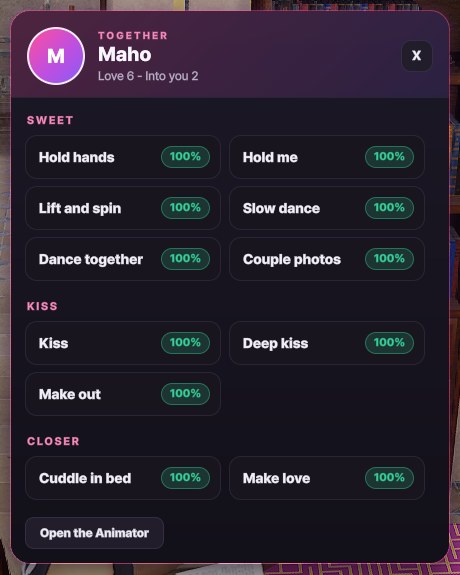 Together, from the social menu
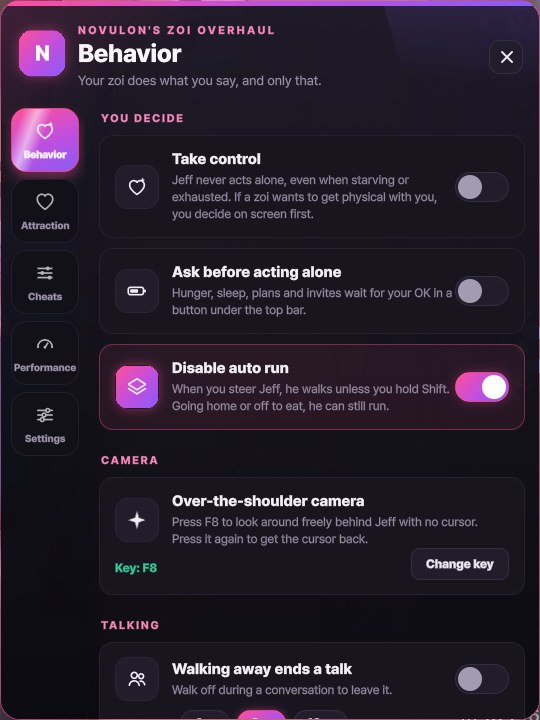 How your zoi behaves
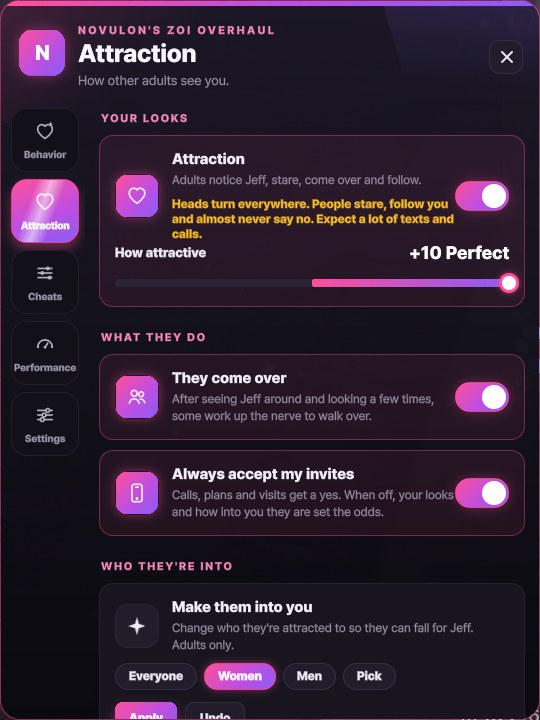 How attractive you are
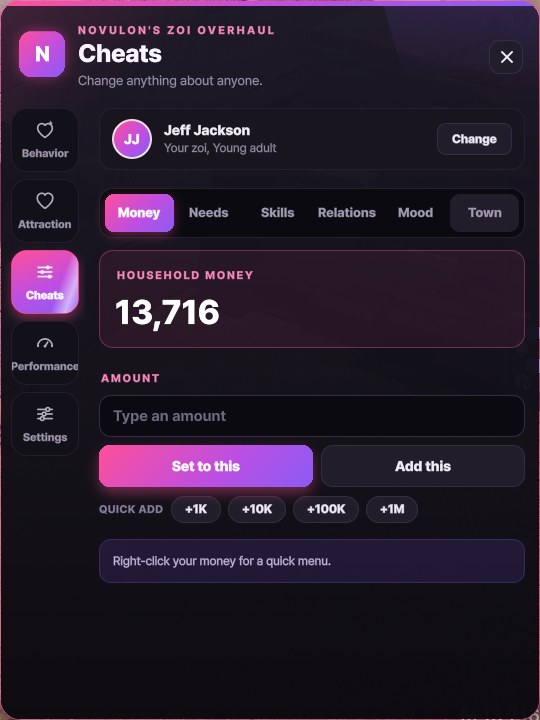 Cheats for anyone
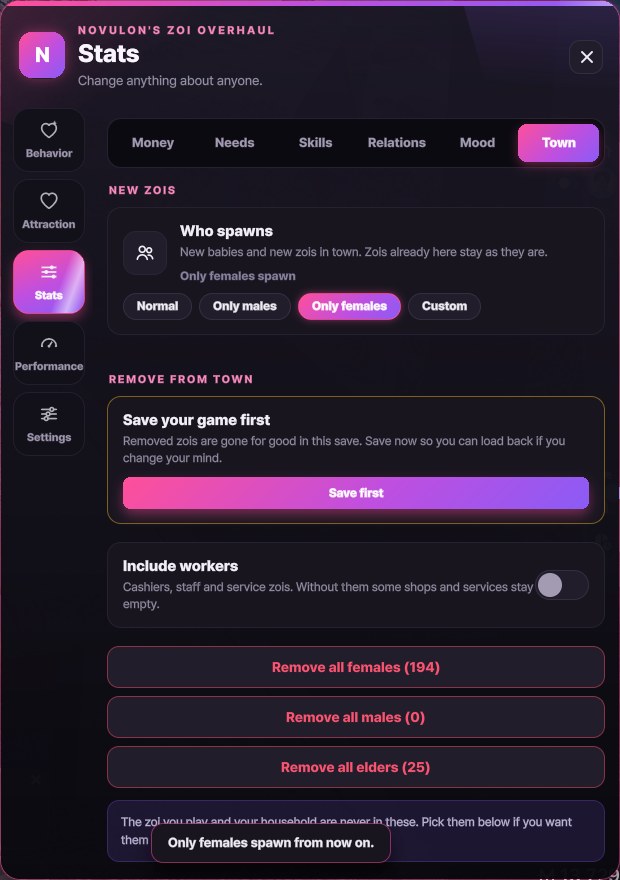 Who spawns, and who goes
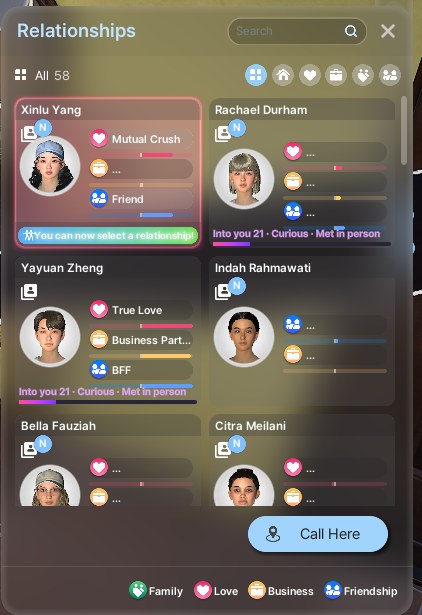 Right-click a relationship
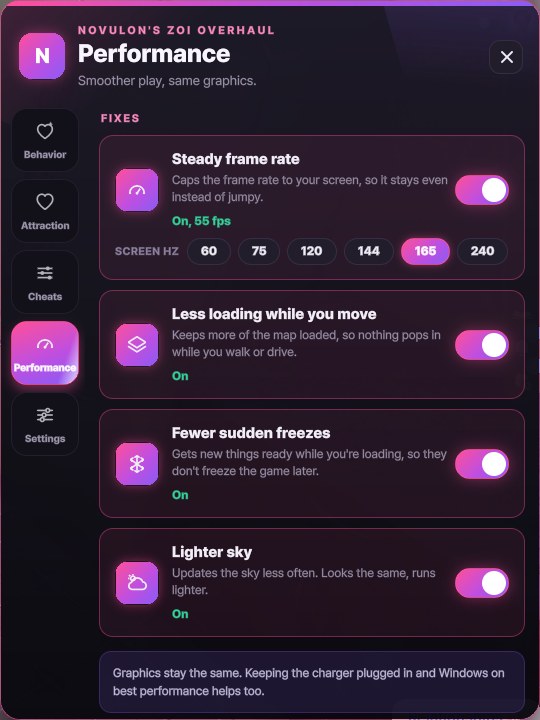 Smoother, same graphics
 NOVULON